
Hey buddy! I hope you’re doing great and working on some exciting projects.
Today, I’ve brought a beautiful and creative project for you.
In this tutorial, you will learn how to create a Flipping Card Animation using HTML, CSS, and JavaScript. This is a modern UI effect that makes your website look more interactive and attractive.
I have already shared many different card design projects before, but this one is special because of its smooth flip animation.
A card is basically a rectangular or square section that displays important information about a specific item or person. Cards are widely used in web design and come in various types, such as:
- Profile Cards
- Product Cards
- Service Cards
- Blog Cards
…and many more.
So, let’s get started and build this amazing flipping card design step by step!
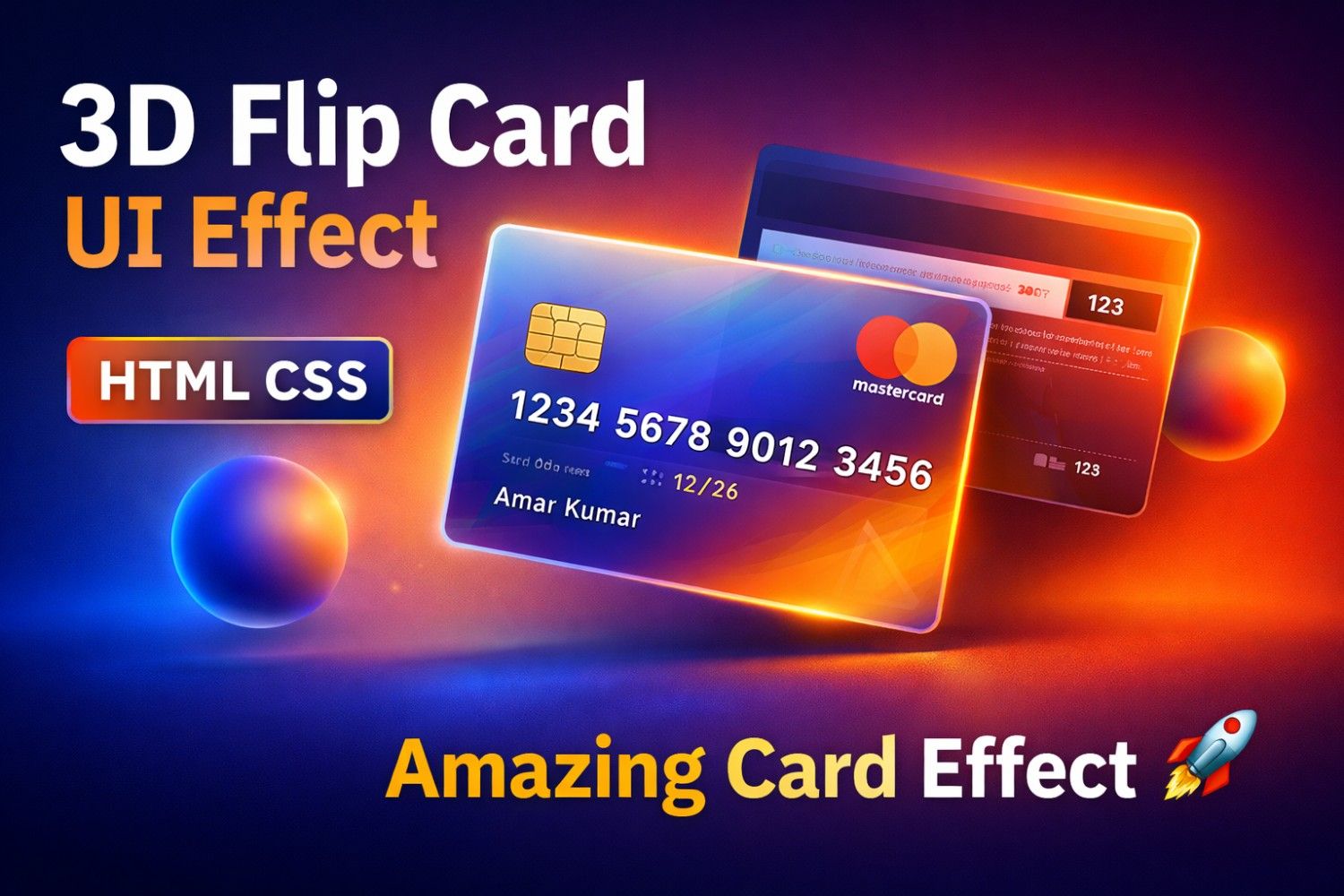
Take a look at the image of our project Flipping Card UI Design. As you can see, the design features a beautiful gradient background with two glowing balls, and at the center, there is a stylish card built with a glassmorphism UI effect.
Inside the card, you’ll notice elements like a MasterCard logo, chip, and card details, including the card number, cardholder name, and validity date. These details make the design look realistic and modern.
The most interesting part of this project is the flip animation. When you hover over the card, it smoothly rotates and reveals the backside. On the back side of the card, additional information is displayed, enhancing both functionality and visual appeal.
To see the real demo of how this card flips and how the backside looks, you can watch the video tutorial provided below. After watching the tutorial, you’ll also understand how the HTML and CSS code works behind the scenes to create this amazing effect.
Flipping Card UI Design in HTML & CSS | Video Tutorial
Before jumping into the source code of this project Flipping Card UI Design, I would like to briefly explain how everything works in the video tutorial.
As you saw in the tutorial, the design initially displays two beautiful gradient balls on the screen. Between these two elements, there is a stylish card that contains essential details typically found on a debit or credit card, such as the cardholder name, card number, expiry date, and other basic information.
The most engaging part of this project is the flip animation. When you hover over the card, it smoothly rotates and reveals the backside. On the back side, additional details are displayed, just like a real card.
In the video, you also saw how I created the gradient balls, designed the card using a glassmorphism UI style, and implemented the flip effect using only HTML and CSS, without any JavaScript.
I hope you can now easily create a similar flipping card animation on hover using HTML and CSS. However, if you face any difficulty while building this project, don’t worry—I have provided the complete HTML and CSS code along with all the required images below, so you can follow along and build it step by step.
💻 Flipping Card UI Design [Source Code]
To create a Flipping Card UI Design using HTML and CSS, follow the steps below carefully:
📁 Step 1: Create Project Folder
First, create a new folder on your system. You can give it any name you like (for example: flipping-card).
📄 Step 2: Create HTML File
Inside the folder, create a file named:
👉 index.html
Make sure the file name is exactly index and the extension is .html
🎨 Step 3: Create CSS File
Now, create another file inside the same folder:
👉 style.css
Ensure the file name is style with the extension .css
⚡ Step 4: Create JavaScript File
Ab JavaScript ke liye file create karo:
👉 script.js
📝 Step 5: Add the Code
Ab teeno files open karo aur respective code paste karo:
- HTML → index.html
- CSS → style.css
- JS → script.js
⬇️ Alternative Option
If you don’t want to create files manually, you can simply scroll down and download the complete source code of this Flipping Card project by clicking the download button provided below.
🚀 HTML Code
Now, copy and paste the following code into your index.html file:
<!DOCTYPE html>
<html lang="en">

<head>
    <meta charset="UTF-8" />
    <meta name="viewport" content="width=device-width, initial-scale=1.0" />
    <title>Ultimate Bank & Card Select UI</title>
    <link href="https://fonts.googleapis.com/css2?family=Poppins:wght@300;400;500;600;700;800&display=swap"
        rel="stylesheet">
<link rel="stylesheet" href="style.css">
</head>

<body>

    <div class="balls-container">
        <div class="ball ball-1"></div>
        <div class="ball ball-2"></div>
    </div>

    <div class="checkout-wrapper">

        <!-- LEFT SIDE: PAYMENT FORM -->
        <div class="payment-form">
            <h2>Payment Details</h2>
            <form action="#" autocomplete="off">

                <!-- TOP ROW: BANK & NETWORK SELECT -->
                <div class="row">
                    <div class="input-group">
                        <label>Bank Name</label>
                        <select id="bankSelect">
                            <option value="default">Virtual Global Bank</option>
                            <option value="sbi">State Bank of India</option>
                            <option value="hdfc">HDFC Bank</option>
                            <option value="icici">ICICI Bank</option>
                            <option value="axis">Axis Bank</option>
                            <option value="kotak">Kotak Mahindra</option>
                        </select>
                    </div>

                    <div class="input-group">
                        <label>Card Type</label>
                        <select id="networkSelect">
                            <option value="mastercard">MasterCard</option>
                            <option value="visa">Visa</option>
                            <option value="rupay">RuPay</option>
                            <option value="amex">Amex</option>
                        </select>
                    </div>
                </div>

                <div class="input-group">
                    <label>Cardholder Name</label>
                    <input type="text" id="nameInput" placeholder="TechnicalTricks.in" maxlength="20">
                </div>

                <div class="input-group">
                    <label>Card Number</label>
                    <input type="text" id="numberInput" placeholder="0000 0000 0000 0000" maxlength="19">
                </div>

                <div class="row">
                    <div class="input-group">
                        <label>Expiry Date</label>
                        <input type="text" id="expiryInput" placeholder="MM/YY" maxlength="5">
                    </div>

                    <div class="input-group">
                        <label>CVV</label>
                        <input type="password" id="cvvInput" placeholder="***" maxlength="3">
                    </div>
                </div>
            </form>
        </div>

        <!-- RIGHT SIDE: THE LIVE DYNAMIC CARD -->
        <div class="card-container">
            <div class="card-inner">
                <!-- Front Side -->
                <div class="front" id="cardFront">
                    <!-- Bank Name & Network Logo Row -->
                    <div class="top-row">
                        <div class="bank-name" id="cardBankName">Virtual Bank</div>
                        <div class="logo-container" id="cardLogoDisplay">
                            <!-- MasterCard is Default -->
                            <div class="mc-logo">
                                <span class="circle circle-1"></span>
                                <span class="circle circle-2"></span>
                            </div>
                        </div>
                    </div>

                    <!-- SVG Chip -->
                    <svg class="chip" viewBox="0 0 100 100" width="40" height="30" xmlns="http://www.w3.org/2000/svg">
                        <rect width="100" height="100" rx="15" fill="#f5d47a" />
                        <path d="M 0 30 L 30 30 L 30 0" fill="none" stroke="#b08d41" stroke-width="4" />
                        <path d="M 0 70 L 30 70 L 30 100" fill="none" stroke="#b08d41" stroke-width="4" />
                        <path d="M 100 30 L 70 30 L 70 0" fill="none" stroke="#b08d41" stroke-width="4" />
                        <path d="M 100 70 L 70 70 L 70 100" fill="none" stroke="#b08d41" stroke-width="4" />
                        <rect x="30" y="30" width="40" height="40" rx="5" fill="none" stroke="#b08d41"
                            stroke-width="4" />
                    </svg>

                    <div class="card-number" id="cardNumberDisplay">#### #### #### ####</div>

                    <div class="card-details">
                        <div class="name">
                            <span>Card Holder</span>
                            <p id="cardNameDisplay">YOUR NAME</p>
                        </div>
                        <div class="valid">
                            <span>Valid Till</span>
                            <p id="cardExpiryDisplay">MM/YY</p>
                        </div>
                    </div>
                </div>

                <!-- Back Side -->
                <div class="back" id="cardBack">
                    <div class="magnetic-stripe"></div>
                    <div class="signature-row">
                        <div class="signature-bar"></div>
                        <div class="cvv-display" id="cardCvvDisplay">***</div>
                    </div>
                    <p class="disclaimer">This card is property of the bank. If found, please return it to the nearest
                        branch. Misuse is a criminal offence under banking laws.</p>
                </div>
            </div>
        </div>

    </div>

    <!-- JavaScript for Live Changes & Auto-Detect -->
  <script src="script.js"></script>
</body>

</html>
🎨 CSS Code
  /* === Basic Reset === */
    * {
        margin: 0;
        padding: 0;
        box-sizing: border-box;
        font-family: 'Poppins', sans-serif;
    }

    body {
        display: flex;
        justify-content: center;
        align-items: center;
        min-height: 100vh;
        background-color: #121321;
        position: relative;
        overflow: hidden;
    }

    /* === Background Animation === */
    .balls-container {
        position: absolute;
        width: 100%;
        height: 100%;
        z-index: 0;
    }

    .ball {
        position: absolute;
        border-radius: 50%;
        filter: blur(20px);
    }

    .ball-1 {
        width: 400px;
        height: 400px;
        background: linear-gradient(to bottom right, #ff3062, #ff7145);
        top: -10%;
        left: -5%;
        animation: float1 6s infinite alternate ease-in-out;
    }

    .ball-2 {
        width: 500px;
        height: 500px;
        background: linear-gradient(to bottom right, #205cff, #061161);
        bottom: -15%;
        right: -5%;
        animation: float2 8s infinite alternate ease-in-out;
    }

    @keyframes float1 {
        0% {
            transform: translateY(0);
        }

        100% {
            transform: translateY(30px);
        }
    }

    @keyframes float2 {
        0% {
            transform: translateY(0);
        }

        100% {
            transform: translateY(-30px);
        }
    }

    /* === Main Wrapper === */
    .checkout-wrapper {
        position: relative;
        z-index: 1;
        display: flex;
        gap: 60px;
        align-items: center;
        flex-wrap: wrap;
        justify-content: center;
        padding: 20px;
    }

    /* =========================================
           LEFT SIDE: PAYMENT FORM
        ========================================= */
    .payment-form {
        background: rgba(255, 255, 255, 0.05);
        backdrop-filter: blur(20px);
        -webkit-backdrop-filter: blur(20px);
        border: 1px solid rgba(255, 255, 255, 0.2);
        border-radius: 20px;
        padding: 35px 40px;
        width: 450px;
        box-shadow: 0 15px 35px rgba(0, 0, 0, 0.2);
        color: white;
    }

    .payment-form h2 {
        font-size: 24px;
        margin-bottom: 25px;
        font-weight: 500;
        text-align: center;
        letter-spacing: 1px;
    }

    .input-group {
        margin-bottom: 15px;
        display: flex;
        flex-direction: column;
    }

    .input-group label {
        font-size: 13px;
        margin-bottom: 6px;
        opacity: 0.8;
        letter-spacing: 1px;
    }

    .input-group input,
    .input-group select {
        padding: 10px 15px;
        background: rgba(255, 255, 255, 0.08);
        border: 1px solid rgba(255, 255, 255, 0.2);
        border-radius: 8px;
        color: white;
        font-size: 15px;
        outline: none;
        transition: 0.3s;
        width: 100%;
    }

    .input-group select {
        cursor: pointer;
        appearance: none;
    }

    .input-group select option {
        background-color: #121321;
        color: white;
    }

    .input-group input:focus,
    .input-group select:focus {
        border-color: #38bdf8;
        background: rgba(255, 255, 255, 0.15);
        box-shadow: 0 0 10px rgba(56, 189, 248, 0.3);
    }

    .row {
        display: flex;
        gap: 15px;
    }

    .row .input-group {
        flex: 1;
    }

    /* =========================================
           RIGHT SIDE: 3D DYNAMIC CARD
        ========================================= */
    .card-container {
        width: 390px;
        height: 250px;
        perspective: 1000px;
    }

    .card-inner {
        width: 100%;
        height: 100%;
        position: relative;
        transition: transform 0.8s cubic-bezier(0.175, 0.885, 0.32, 1.275);
        transform-style: preserve-3d;
    }

    /* Flipping Magic */
    .checkout-wrapper:has(#cvvInput:focus) .card-inner,
    .card-container:hover .card-inner {
        transform: rotateY(180deg);
    }

    .front,
    .back {
        position: absolute;
        width: 100%;
        height: 100%;
        -webkit-backface-visibility: hidden;
        backface-visibility: hidden;
        border-radius: 20px;

        background: rgba(255, 255, 255, 0.1);
        backdrop-filter: blur(25px);
        -webkit-backdrop-filter: blur(25px);
        box-shadow: 0 25px 45px rgba(0, 0, 0, 0.2);
        border: 1px solid rgba(255, 255, 255, 0.3);

        color: #fff;
        transition: background 0.6s ease;
    }

    .front {
        padding: 25px;
        display: flex;
        flex-direction: column;
        justify-content: space-between;
    }

    .top-row {
        display: flex;
        justify-content: space-between;
        align-items: center;
    }

    .bank-name {
        font-size: 18px;
        font-weight: 700;
        font-style: italic;
        text-shadow: 0 2px 4px rgba(0, 0, 0, 0.4);
    }

    /* ==== CARD NETWORK LOGOS (Pure CSS/HTML) ==== */
    .logo-container {
        height: 35px;
        display: flex;
        align-items: center;
    }

    /* 1. MasterCard */
    .mc-logo .circle {
        display: inline-block;
        width: 30px;
        height: 30px;
        border-radius: 50%;
    }

    .mc-logo .circle-1 {
        background: rgba(235, 0, 27, 0.9);
        position: relative;
        left: 12px;
        z-index: 2;
    }

    .mc-logo .circle-2 {
        background: rgba(247, 158, 27, 0.9);
        z-index: 1;
    }

    /* 2. Visa */
    .visa-logo {
        font-size: 28px;
        font-weight: 800;
        font-style: italic;
        letter-spacing: 1px;
        text-shadow: 0 2px 5px rgba(0, 0, 0, 0.3);
    }

    /* 3. RuPay */
    .rupay-logo {
        font-size: 22px;
        font-weight: 800;
        font-style: italic;
        display: flex;
        align-items: center;
        text-shadow: 0 2px 5px rgba(0, 0, 0, 0.3);
    }

    .rupay-logo .ru {
        color: #ffffff;
    }

    .rupay-logo .pay {
        color: #f79e1b;
    }

    /* Orange accent for Rupay */

    /* 4. Amex */
    .amex-logo {
        font-size: 16px;
        font-weight: 700;
        background-color: #205cff;
        padding: 4px 8px;
        border-radius: 4px;
        letter-spacing: 1px;
        box-shadow: 0 2px 5px rgba(0, 0, 0, 0.3);
        border: 1px solid rgba(255, 255, 255, 0.5);
    }

    /* Middle Section */
    .chip {
        margin-top: -10px;
    }

    .card-number {
        font-size: 26px;
        letter-spacing: 3px;
        font-weight: 500;
        text-shadow: 0 2px 4px rgba(0, 0, 0, 0.3);
    }

    .card-details {
        display: flex;
        justify-content: space-between;
    }

    .card-details span {
        font-size: 10px;
        text-transform: uppercase;
        letter-spacing: 1px;
        opacity: 0.8;
    }

    .card-details p {
        font-size: 15px;
        font-weight: 500;
        text-transform: uppercase;
        margin-top: 3px;
    }

    /* BACK FACE */
    .back {
        transform: rotateY(180deg);
    }

    .magnetic-stripe {
        width: 100%;
        height: 45px;
        background: #111;
        margin-top: 30px;
    }

    .signature-row {
        margin: 20px 25px;
        display: flex;
        align-items: center;
    }

    .signature-bar {
        flex: 1;
        height: 40px;
        background: repeating-linear-gradient(45deg, #fff, #fff 5px, #f0f0f0 5px, #f0f0f0 10px);
        border-radius: 5px 0 0 5px;
    }

    .cvv-display {
        height: 40px;
        background: #fff;
        color: #111;
        font-weight: bold;
        display: flex;
        align-items: center;
        justify-content: center;
        padding: 0 15px;
        border-radius: 0 5px 5px 0;
        font-size: 14px;
        min-width: 50px;
    }

    .disclaimer {
        font-size: 9px;
        opacity: 0.8;
        margin: 0 25px;
        text-align: justify;
    }
⚡ JavaScript Code
   <script>
        // Inputs
        const nameInput = document.getElementById('nameInput');
        const numberInput = document.getElementById('numberInput');
        const expiryInput = document.getElementById('expiryInput');
        const cvvInput = document.getElementById('cvvInput');
        const bankSelect = document.getElementById('bankSelect');
        const networkSelect = document.getElementById('networkSelect');

        // Display Targets
        const cardNameDisplay = document.getElementById('cardNameDisplay');
        const cardNumberDisplay = document.getElementById('cardNumberDisplay');
        const cardExpiryDisplay = document.getElementById('cardExpiryDisplay');
        const cardCvvDisplay = document.getElementById('cardCvvDisplay');
        const cardBankName = document.getElementById('cardBankName');
        const cardLogoDisplay = document.getElementById('cardLogoDisplay');
        const cardFront = document.getElementById('cardFront');
        const cardBack = document.getElementById('cardBack');

        // === 1. BANK THEMES (Colors) ===
        const bankThemes = {
            default: { name: "Virtual Bank", bg: "rgba(255, 255, 255, 0.1)" },
            sbi: { name: "State Bank of India", bg: "linear-gradient(135deg, rgba(0, 85, 135, 0.95), rgba(36, 160, 237, 0.95))" },
            hdfc: { name: "HDFC Bank", bg: "linear-gradient(135deg, rgba(0, 76, 143, 0.95), rgba(237, 35, 42, 0.95))" },
            icici: { name: "ICICI Bank", bg: "linear-gradient(135deg, rgba(178, 41, 46, 0.95), rgba(243, 112, 33, 0.95))" },
            axis: { name: "Axis Bank", bg: "linear-gradient(135deg, rgba(151, 20, 77, 0.95), rgba(239, 65, 54, 0.95))" },
            kotak: { name: "Kotak Mahindra", bg: "linear-gradient(135deg, rgba(237, 28, 36, 0.95), rgba(0, 51, 102, 0.95))" }
        };

        // === 2. CARD LOGOS (HTML Structures) ===
        const networkLogos = {
            mastercard: `<div class="mc-logo"><span class="circle circle-1"></span><span class="circle circle-2"></span></div>`,
            visa: `<div class="visa-logo">VISA</div>`,
            rupay: `<div class="rupay-logo"><span class="ru">Ru</span><span class="pay">Pay</span></div>`,
            amex: `<div class="amex-logo">AMEX</div>`
        };

        // Bank Select Event
        bankSelect.addEventListener('change', (e) => {
            const selectedBank = bankThemes[e.target.value];
            cardBankName.innerText = selectedBank.name;
            cardFront.style.background = selectedBank.bg;
            cardBack.style.background = selectedBank.bg;
        });

        // Network Logo Select Event
        networkSelect.addEventListener('change', (e) => {
            cardLogoDisplay.innerHTML = networkLogos[e.target.value];
        });

        // Name Update
        nameInput.addEventListener('input', (e) => {
            cardNameDisplay.innerText = e.target.value.toUpperCase() || 'YOUR NAME';
        });

        // Card Number Update + Auto Detect Network!
        numberInput.addEventListener('input', (e) => {
            let value = e.target.value.replace(/\D/g, '');

            // AUTO DETECT MAGIC
            if (value.startsWith('4')) {
                networkSelect.value = 'visa';
            } else if (value.startsWith('5')) {
                networkSelect.value = 'mastercard';
            } else if (value.startsWith('6')) {
                networkSelect.value = 'rupay';
            } else if (value.startsWith('3')) {
                networkSelect.value = 'amex';
            }

            // Trigger logo update manually after auto-detect
            cardLogoDisplay.innerHTML = networkLogos[networkSelect.value];

            // Add spaces
            value = value.replace(/(.{4})/g, '$1 ').trim();
            e.target.value = value;
            cardNumberDisplay.innerText = value || '#### #### #### ####';
        });

        // Expiry Update
        expiryInput.addEventListener('input', (e) => {
            let value = e.target.value.replace(/\D/g, '');
            if (value.length > 2) {
                value = value.substring(0, 2) + '/' + value.substring(2, 4);
            }
            e.target.value = value;
            cardExpiryDisplay.innerText = value || 'MM/YY';
        });

        // CVV Update
        cvvInput.addEventListener('input', (e) => {
            let value = e.target.value.replace(/\D/g, '');
            e.target.value = value;
            cardCvvDisplay.innerText = value || '***';
        });
If you face any difficulties while creating this Credit Card UI Design, or if your code is not working as expected, don’t worry.
You can easily download the complete source code files for this project by clicking on the download button provided below. This will help you quickly set up the project without any errors.
Additionally, you can also check the live demo of this flipping card design by clicking on the View Live button. This will give you a clear idea of how the card works, including its smooth flip animation and overall UI behavior.